Changelog

Release notes and what to test

Beta Portal › Changelog

You're signed in but not yet a beta tester.

Contact support@digimill.ie to request access.

Sign out

16 March 2026 v1.0.18+34

iPad Cockpit Layout, Nav Dashboard Refresh, Course Diagrams & Onboarding

iPad Cockpit Layout

  • Split‑screen cockpit — on tablets (iPad and large Android), the nav dashboard becomes a two‑panel view: hero navigation data on the left, course diagram and mark list on the right.
  • Hero metrics — distance to mark (DTW) and bearing (BTW) displayed in large, glanceable numbers that scale with screen size. Active mark icon with rounding indicator.
  • Detail panel — tapping a mark shows wind details in the chart area instead of a bottom sheet, for seamless sidecar viewing.

Navigation Dashboard Refresh

  • Course info header — new pill badges showing course ID, wind bearing, VHF channel and start location at the top of active navigation.
  • Enhanced mark tiles — rounding direction (port/starboard icons), pre‑calculated leg time, next‑leg wind context (TWA/AWA), point‑of‑sail colour coding.
  • Collapsible wind and mark controls — reduces on‑screen clutter so you can focus on sailing.
  • TWD long‑press opens the bearing picker for direct dial‑in of true wind direction.
  • Completed long‑press abbreviation legends (BS, kn, opt, etc.) — long‑press any abbreviation to see what it means.
  • Landscape support on phones with collapsible sidebar for wind/mark controls.

Course Diagram Improvements

  • Four chart modes — Course Static, Course Animated, Mark Static, Mark Animated. Toggle via long‑press context menu on the diagram.
  • Belt vs Track — "Belt" shows realistic rounding arcs at each mark; "Track" draws straight legs.
  • Mark icon sizing — slider to scale mark icons from 0.5x to 2.0x for visibility preference.
  • Active mark highlighting — current mark shown larger with thicker stroke; passed marks dimmed, upcoming marks at medium opacity.

New Onboarding

  • Location‑aware club discovery — the app detects your location and suggests nearby sailing grounds.
  • Welcome flow shows every launch until you pick a sailing ground — not a one‑time gate.
  • Interest form for coming‑soon sailing grounds — register before a club goes live.

Also New

  • Custom Courses — create your own mark sequences with the mark picker, set rounding order, and the app auto‑navigates to the nav dashboard after creation.
  • Race Timer — 5‑min and 4‑min gun preset buttons for quick start sequences.
  • Compact direction indicators on course sequence.

Bug Fixes

  • Event switch no longer shows stale 2025 data under the 2026 season
  • Layout overflow fixed on smaller screens (course editor, bearing picker, nav dashboard)
  • Settings text overflow fixed on narrow devices
  • iOS Settings.bundle added — you can now see the app version directly in iOS Settings
Please test:
  • iPad cockpit — open the app on a tablet, start a race, check the split‑screen layout with hero DTW/BTW and course diagram
  • Course diagram — long‑press to try chart modes, belt/track toggle, and mark icon sizing
  • Onboarding — delete and reinstall (or clear app data) to retrigger the welcome flow
  • Custom courses — create a 3+ mark sequence and navigate it start to finish
  • Mark tiles — tap marks to see rounding, leg time, and wind context
  • Race timer — try the 5‑min and 4‑min gun presets
3 March 2026 v1.0.16+32

Navigator Dashboard Refresh, Wind Tools & Race Timer Improvements

Note: Build v1.0.15+31 was faulty and packaged with the wrong RevenueCat key. Use v1.0.16+32 or later.

Navigation Dashboard

  • Enriched mark tiles with next‑leg context and clearer rounding details
  • Course info header bar added to active navigation
  • Long‑press explainers for key navigation tiles

Race Timer & Start Flow

  • Race timer controller updates for more reliable start alignment
  • Cleaner separation between timing UI and navigation tiles

Wind & Point‑of‑Sail

  • Wind triangle diagram added to expanded mark tiles
  • AWA‑based point‑of‑sail labels with optimal angle/VMG hints
Please test:
  • Mark tiles — expand a mark and check rounding + next‑leg info
  • Wind tools — verify wind triangle + point‑of‑sail updates as headings change
  • Race timer — confirm start alignment and stopwatch behaviour during a race

28 February 2026 v1.0.14+30

Polar & Vessel Sync + Navigation Controls

Vessel & Polar Data

  • Boat and polar data now saved to Firestore (multi‑device ready)
  • Polar calculator refreshes after saving settings
  • Improved AWA calculation and polar extrapolation beyond grid range

Navigation Controls

  • TWD/TWS controls replace prev/next buttons for navigator mode
  • Point‑of‑sail panel redesign with clearer labels and VMG
Please test:
  • Settings sync — update boat/polar data and confirm it persists
  • AWA/PoS — verify readouts in varying wind conditions
  • TWD/TWS controls — check adjustments update the nav display

25 February 2026 v1.0.13+29

Navigator Dashboard, Wear OS Watch App & Bug Fixes

Navigator Dashboard

  • Pull-to-stop gesture replaces the stop button — pull down firmly from the top to end a race
  • Stop Race also available via the settings menu as a safety net
  • Dashboard is now fully scrollable with landscape support
  • Course visual maps on the navigation screen

Wear OS Companion App

  • Galaxy Watch support — your navigation mirrored to your wrist in real time
  • Race timer with countdown and elapsed modes on the watch face
  • Mark list with distance, bearing, and rounding direction
  • Rotary bezel scrolling through mark details
  • Haptic buzz when marks auto-advance
  • Always-on display for glanceable nav data at the helm

Bug Fixes

  • Watch now syncs reliably on launch and catches up if opened mid-race
  • Active race banner now shows correctly after navigating back to the home page
  • Nav prev/next buttons no longer hidden behind the system bar
Please test:
  • Watch pairing — pair a Galaxy Watch, start a race, check the watch mirrors mark list and timer
  • Race banner — start a race, navigate to Home, come back — banner should appear
  • Pull-to-stop — pull down firmly from dashboard top to stop a race
  • Landscape — rotate to landscape during a race and check layout adapts

23 February 2026 v1.0.12+28

Subscriptions & Purchase Flow

Sign-in Before Purchase

  • Tapping a locked feature now prompts you to sign in first before showing the paywall
  • If you already purchased on another device, signing in restores your subscription automatically
  • You can still continue without signing in if you prefer

Consistent Upsell Prompts

  • All locked features now show a consistent compact upsell row with a lock icon and tier badge
  • Clearer indication of which subscription tier unlocks each feature

Bug Fixes

  • Fixed an issue where completing a purchase could jump you back too many screens
  • "Phone Support" in Settings renamed to "Leave a Voice Message" to better describe what it does
  • Bottom sheet layout fix on Android — content no longer hidden behind the navigation bar
Please test: Sign out, tap any locked feature (e.g. Custom Courses), and check the sign-in sheet appears. Try signing in — if you already have a subscription it should restore automatically. Also try "Continue without signing in" to go straight to the paywall.

20 February 2026 v1.0.11+27

UI Polish & Region Selector

Region Selector Redesign

  • Location badge now sits directly next to the region dropdown for clearer visual grouping
  • Cleaner layout on the club selection screen

Dark Mode Fixes

  • Improved contrast across the beta page and several app screens
  • Settings screen layout refinements
Please test: Open the club selector and check the region dropdown looks right. Switch between light and dark mode in Settings and check nothing is hard to read.

19 February 2026 v1.0.10+26

Quick Access Shortcuts & Mark Improvements

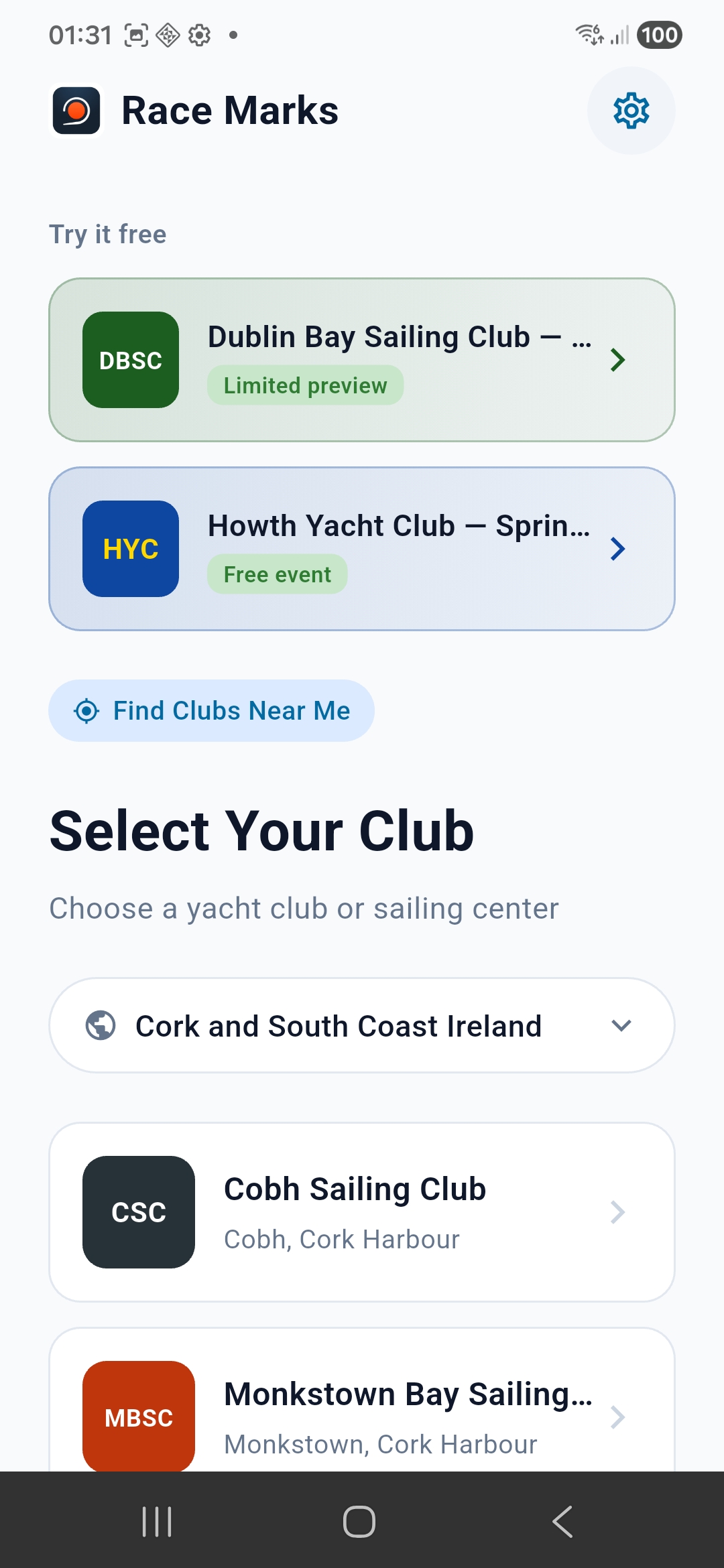
"Try it free" Promo Shortcuts

  • New shortcut cards at the top of the home screen for DBSC and HYC
  • Jump directly into a valid club/event combination without navigating through selection
  • Perfect for quickly testing the app with real data
Homepage with Try it free shortcuts

New shortcut cards for quick access to DBSC and HYC

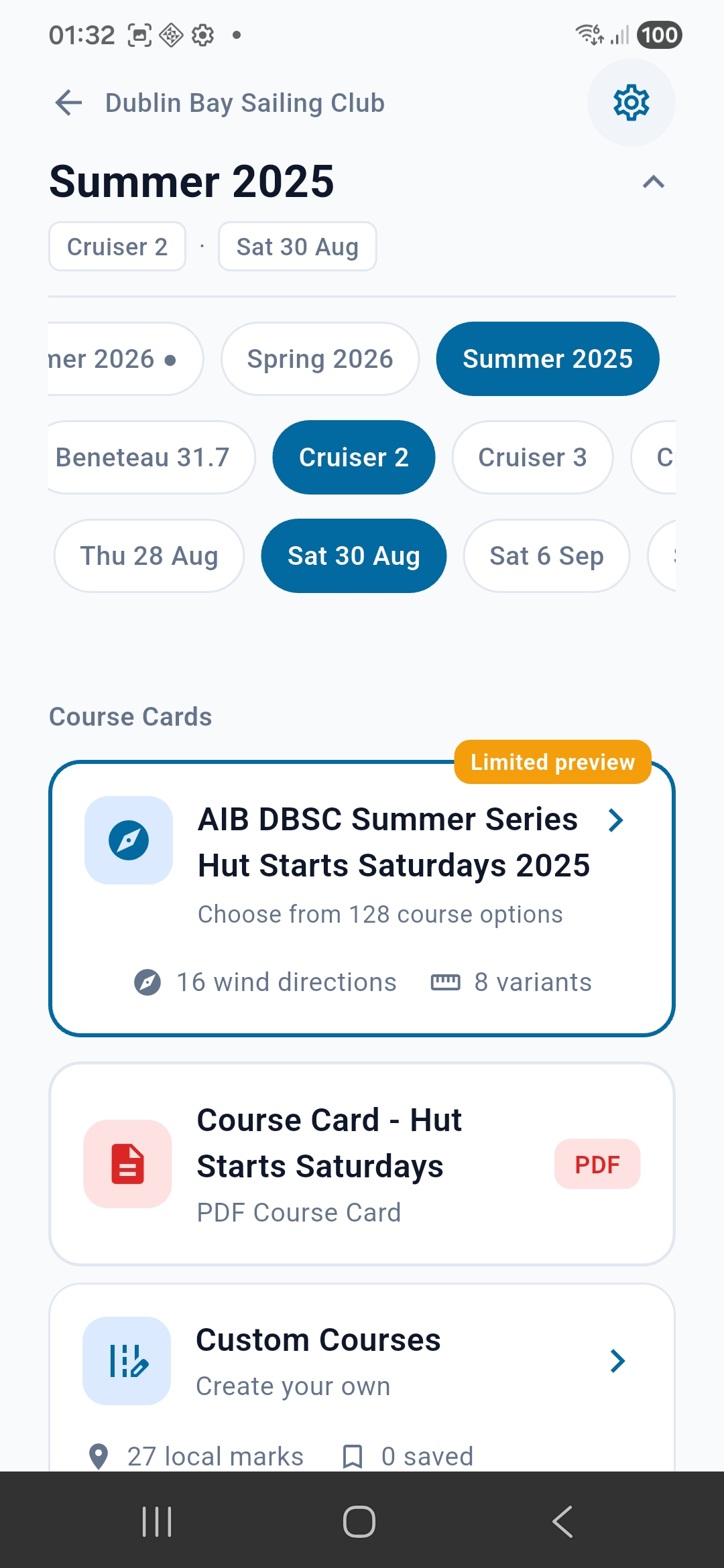
Tap a shortcut to jump straight to the event page:

DBSC event page

DBSC Summer 2025 — filter by class and date

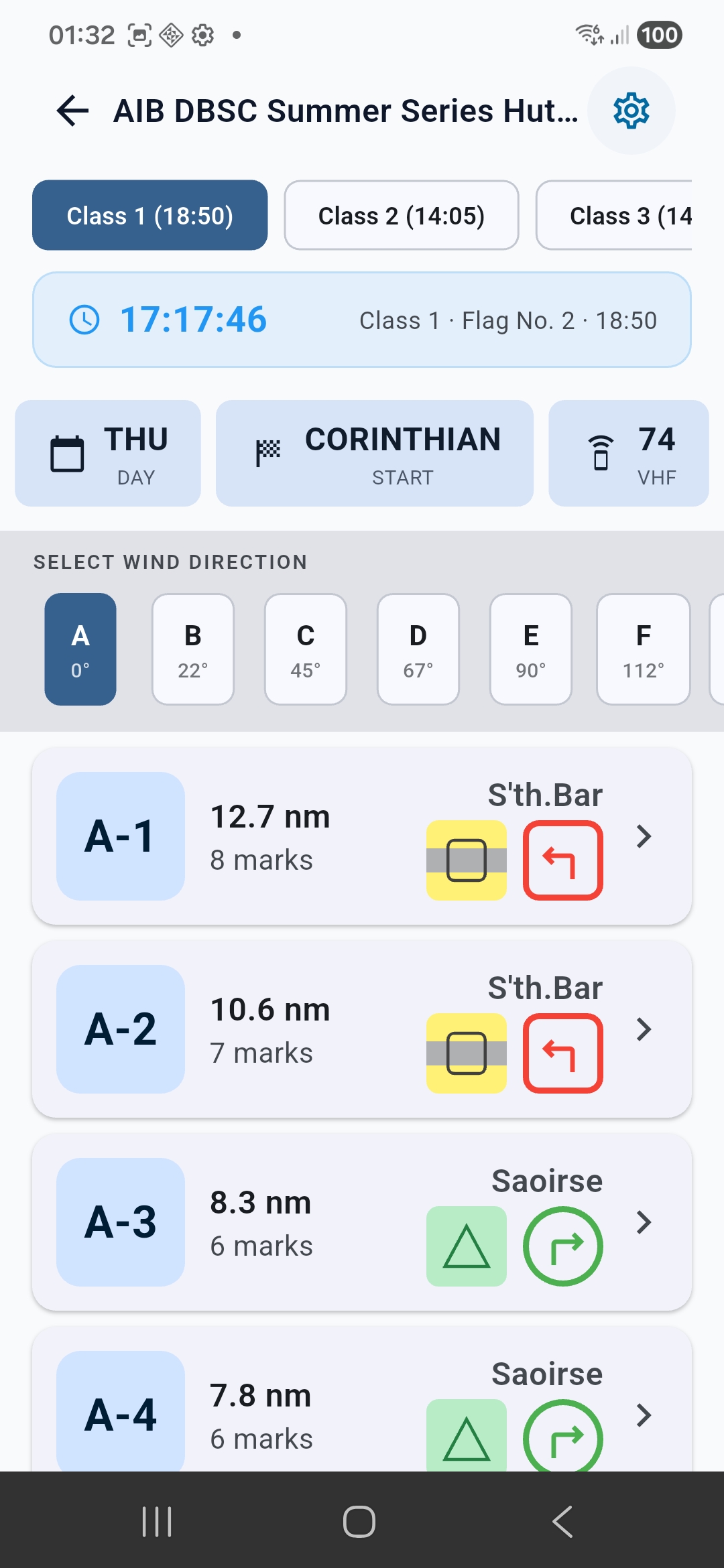
Then browse courses by wind direction:

Course list with wind directions

Course options with mark icons and rounding directions

Local Marks Page

  • Added colour/appearance text below each mark name (e.g., "Orange Cone", "Yellow-Black-Yellow (YBY)")
  • Makes it easier to identify marks without relying solely on the icon

Mark Icon Colours Fixed

  • Merrion (L) — Now correctly shows Black-Yellow-Black (BYB) pattern
  • Molly (N) — Now correctly shows 5-stripe Yellow-Black-Yellow-Black-Yellow (YBYBY) pattern
  • Battery (T) — Now correctly shows White-Green (WG) stripes

Navigation Dashboard

  • Fixed layout overflow when mark names wrap to two lines
  • Dashboard now adapts height to content instead of clipping
Please test: Use the DBSC shortcut to jump in, pick a course, and start navigation. Check that Merrion, Molly, and Battery show correct colour patterns in Local Marks.
Navigator tier testers: Please check if the device rotation / compass heading seems correct for you. We're investigating reports of erratic compass behaviour on some Android devices.